| Item | Explanation |
| Do not Contact (DNC) | If the client requests not be contacted in future it must be loaded on Merlot. Always ensure you select the correct criteria when loading the lead. |
| Merlot | This is the system used by Lead Generation to capture client details and referrals. We use Merlot to load the details of clients that don’t want to be contacted. This flags the number so it is removeed and a consultant doesn’t call them. |
| Access | https://pllg.platlife.cloud/#/dnc/dnc_view If you use the link, this is the page that opens. |
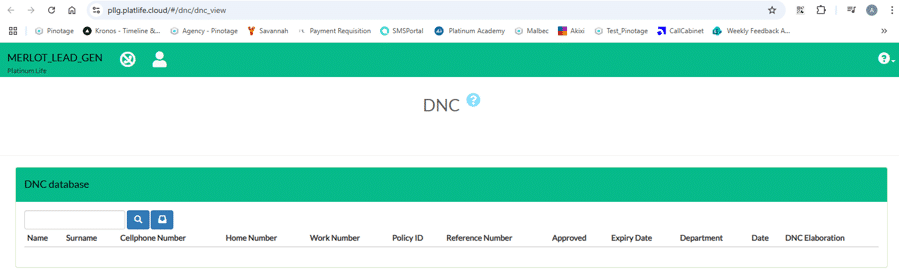
| Item | Explanation |
| The search function | This allows you to search for a number to confirm if it has been added to the DNC list. |
| The blue button with a tray on it. | This is the form you need to complete to load the number on the form. |
| Add DNC request | Form |
| Policy ID | The Pinotage policy number. |
| Reference number | The reference number from the free certificate of cover. |
| Name | Client’s name |
| Surname | Client’s Surname |
| Cellphone number | Cell number |
| Work number | Additional contact number |
| Home number | Additional contact number |
| Notes | Always says Do Not Contact |
| Duration (Years) | How long until we can call the client again. |
| Department | The department that loaded the request |
| Please select the applicable boxes: | Select who the client doesn’t want to be contacted by. Do Not Contact From IG Do Not Contact Form IPS Do Not Contact From The Box Do Not Contact From LTR Do Not Contact From Hobby Group Do Not Contact All Ventures Platinum Life Do Not Contact for Upgrades All : Do Not Contact AT ALL |
