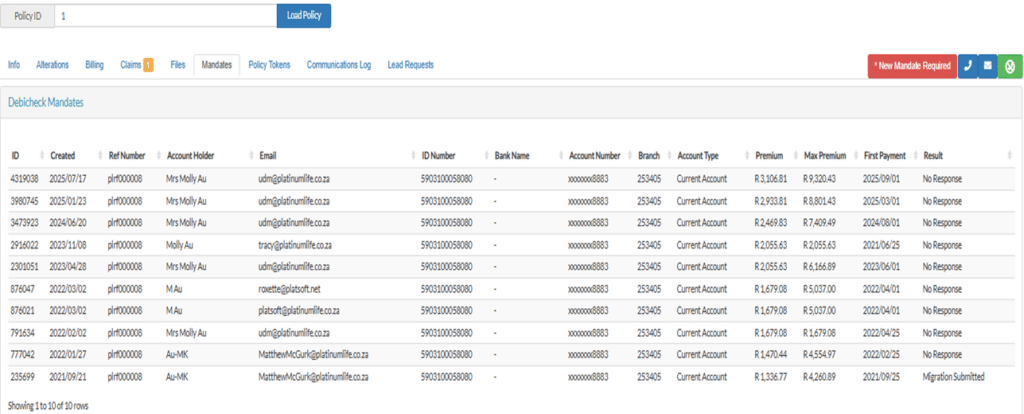
| Item | Explanation |
|---|---|
| Mandate | When the client accepts the mandate we have permission to debit their account. If the client has accepted the mandate, they will not be able to stop the debit order or do a reversal at the bank. |
| Debicheck Mandate | The mandates tab shows the number of mandates sent to the client and who sent them. This also shows if the client has accepted the mandate or not. |
| ID | The mandate ID number. |
| Created | The date the mandate was sent to the client. |
| Account Holder | The name of the account holder. |
| The email address of the person who sent the mandate request. | |
| ID number | Account holder’s ID number |
| Bank name | |
| Account number | |
| Branch | |
| Account type | |
| Premium | The current premium. |
| Max Premium | The highest amount we can request from the client. |
| First Payment | When the new premium is effective. |
| Result | No response – There was no response from the client. |
| Accepted – The client accepted the mandate. | |
| Rejected – The client rejected the mandate. | |
